
Every business owner hits this moment eventually: you're standing in an electronics store, looking at a 65-inch smart TV for a fraction of what the commercial display costs, and it looks just as sharp. Same size, similar picture, better price tag. So why does the commercial version cost more than double?
The honest answer is that these two products aren't really competing with each other. A smart TV is built for a living room, a few hours a night, controlled lighting, and a remote on the couch. A commercial display is built for a business that needs a screen to work all day, every day, without complaint. They look similar on a shelf. They are not similar once you put them to work.
Here's what actually separates the two, and where a smart TV is genuinely the right call.
Built for Different Jobs
Smart TVs are engineered around the home viewing experience. Manufacturers put their effort into color for movies, contrast for dark rooms, and a smooth interface for streaming apps. None of that engineering was built with the idea that the screen might run for twelve hours straight, seven days a week.
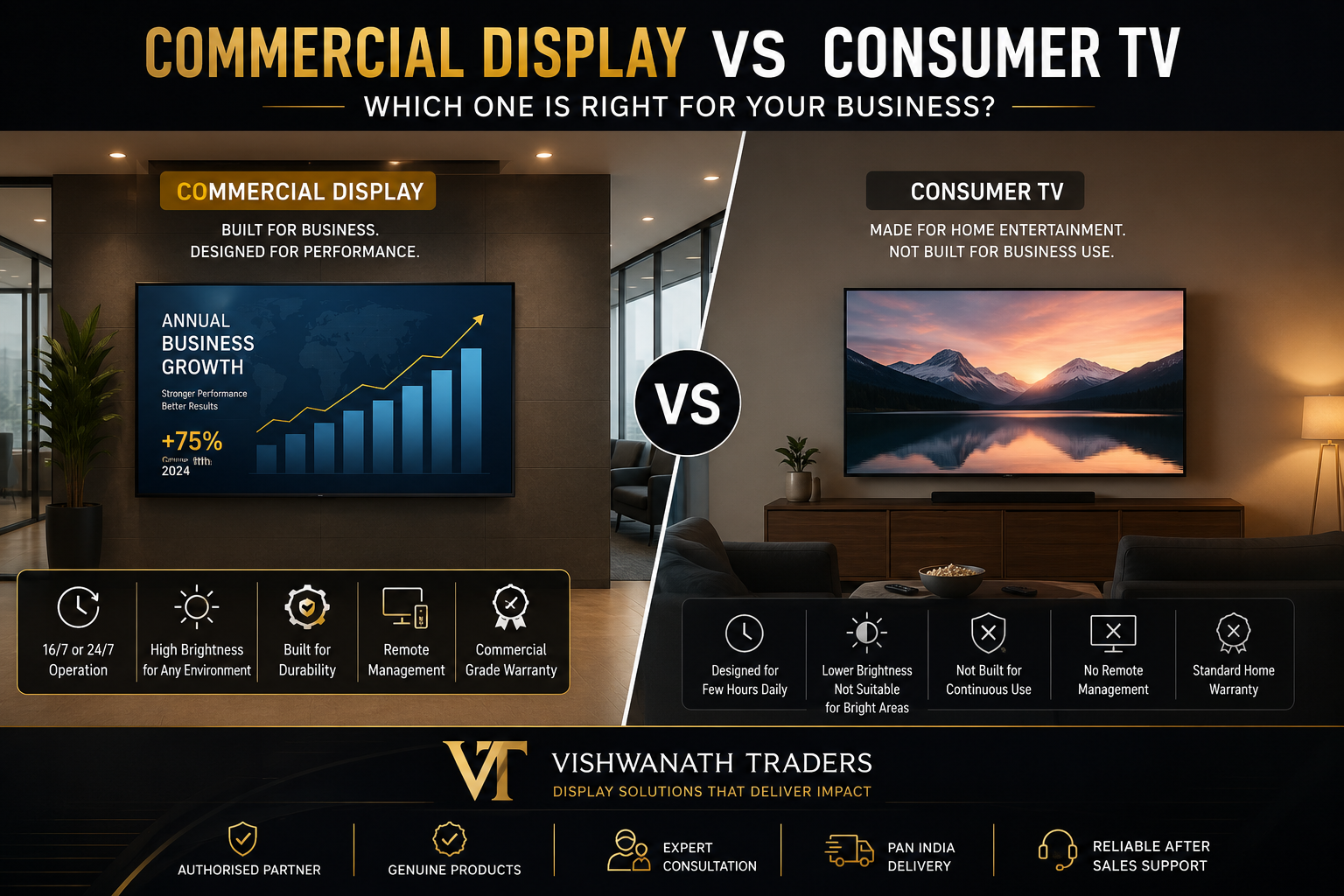
Commercial displays are built around a different problem: staying on and staying legible. You'll find them running signage in retail stores, flight information in airports, and branding loops in corporate lobbies, often for years without being switched off. The internal components the power supply, the cooling system, the panel itself are chosen with that workload in mind. A smart TV can handle a year or two of business hours before it starts to show wear. A commercial display is built to keep going well past that.
What Happens When You Run a TV All Day
If you're running a menu board in a café or a promotional loop in a store, that screen is probably on for twelve to sixteen hours a day. Consumer televisions were never rated for that. Heat builds up during long run times, and without the ventilation a commercial unit has, the internal electronics start to degrade faster than expected.
Most commercial displays carry a 16/7 or 24/7 duty rating, meaning the hardware is actually built to handle that kind of continuous cycle. Push a home TV into that same schedule and you'll usually run into image retention a logo or menu item that leaves a faint ghost burned into the screen or a backlight that fails outright. It's a bit like the difference between a delivery van and a sedan. Both can carry cargo occasionally, but only one is built to do it every day without breaking down.
Lighting Changes Everything
A living room is dim and controlled. Your storefront, lobby, or dining room usually isn't. Overhead fluorescents, big windows, afternoon sun through the glass none of that is kind to a screen built for a dark room.
Put a smart TV in that kind of space and it often turns into a mirror, reflecting the room and washing out whatever's on screen. Commercial displays are built with much higher brightness, measured in nits, specifically to stay readable under those conditions, along with better anti-glare coatings to cut down on reflection. If customers can't read your sign from across the room, it doesn't matter how sharp the picture technically is it's not doing its job.
Managing More Than One Screen
A single TV is easy enough to manage. Walk over, grab the remote, done. That approach falls apart fast once you have five, ten, or fifty screens across different locations, and someone has to update pricing or swap a promo video on every single one.
Commercial displays are built with that problem in mind. Most support LAN connections, RS232, or cloud-based management software, so an IT team can control the entire network from one dashboard scheduling power on and off, checking which units are online, and pushing new content everywhere at once. For a business with more than a handful of screens, this alone is usually reason enough to go commercial.
Mounting Matters More Than You'd Expect
Consumer TVs are built to hang or sit in landscape orientation, full stop. Their cooling depends on gravity pulling heat upward in that position. Mount a standard TV vertically for a portrait sign, and you're inviting overheating, hardware failure, and a voided warranty in fairly short order.
Commercial displays don't have that restriction. Many are certified for portrait and landscape both, and some can even be mounted face-up or from the ceiling. They also tend to have thinner, more uniform bezels, which matters a lot if you're ever building a video wall those narrow borders are what keep the combined image looking like one screen instead of several stitched together.
Read the Warranty Before You Buy
This is the detail most businesses miss. Consumer TV warranties almost always specify residential use only. Install one in a restaurant, retail shop, or waiting room, and the manufacturer can void the warranty the moment something fails, regardless of the unit's age.
Commercial display warranties are written with business use in mind, often including faster support and on-site repair or replacement options. You're paying more upfront, but part of what you're buying is a safety net for the hours your business actually depends on that screen.
The Real Cost Isn't the Price Tag
A 65-inch smart TV might run around $600. A comparable commercial display might be closer to $1,300. On paper, that looks like an easy decision.
But stretch that comparison over three to five years. If the smart TV fails after 18 months of business use, you're paying for a replacement unit, the labor to install it, and whatever revenue or engagement you lost while the screen was dark. A commercial display, built to survive that same environment, usually ends up cheaper once you count everything instead of just the sticker price.
When a Smart TV Is Actually Fine
None of this means smart TVs have no place in a business. A quiet breakroom, a small private office, or a waiting area where the screen runs for an hour or two a week for the occasional video call a smart TV handles that without issue. If the screen isn't central to your customer experience, isn't running all day, and sits somewhere controlled, there's no need to spend extra on commercial hardware. The real question is how much is riding on that screen staying on and looking right.
Frequently Asked Questions
Can I use a consumer TV for menu boards? It's not a good idea. Menu boards run long hours and often need portrait orientation, both of which push a consumer TV past what it's built for, usually leading to overheating or image retention within months.
What are nits, and why do they matter for a display? Nits measure screen brightness. Commercial displays are rated much higher than consumer TVs, which is what keeps content readable in spaces with strong sunlight or bright overhead lighting.
Do commercial displays have built-in speakers? Some do, but they're usually an afterthought. Most businesses pair a commercial display with a separate audio system for better sound coverage across the space.
Can I run content management software directly on a commercial display? Yes — many commercial displays include built-in System-on-Chip technology, letting you run signage software directly on the screen without a separate media player.
Final Thoughts
The choice between a smart TV and a commercial display really comes down to how much you're depending on that screen. If it's part of your customer experience, your daily operations, or your brand image, a commercial display is worth the extra cost, because it's built to survive the exact conditions your business puts it through. If it's a low-traffic screen in a back office, a smart TV will do the job just fine.
If you're not sure which category your setup falls into, it's worth a quick conversation with a display specialist before you buy a five-minute question now is a lot cheaper than replacing the wrong screen in a year.