

Interactive Flat Panel: Complete Business Guide for Smart Classrooms & Modern Workplaces
Introduction
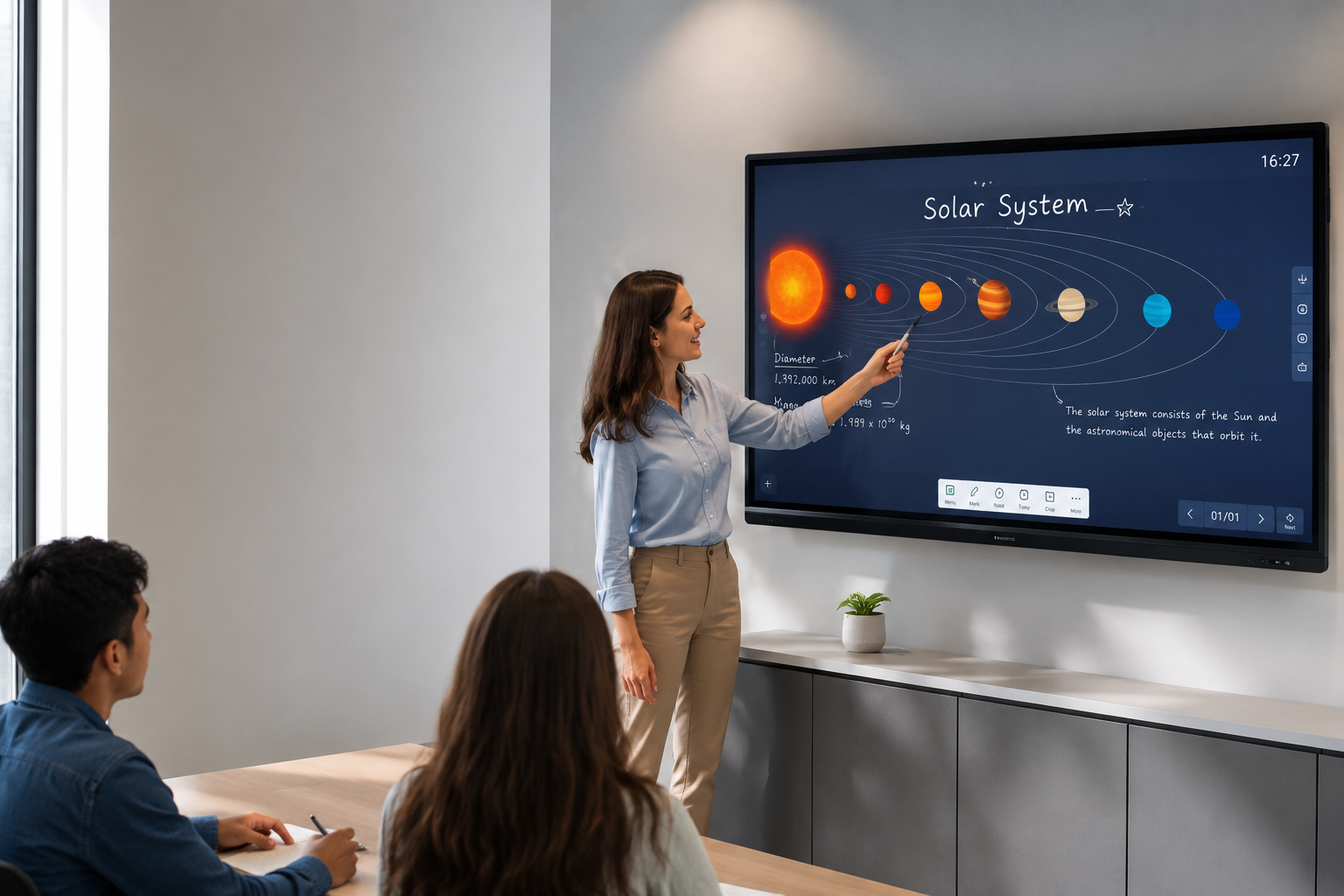
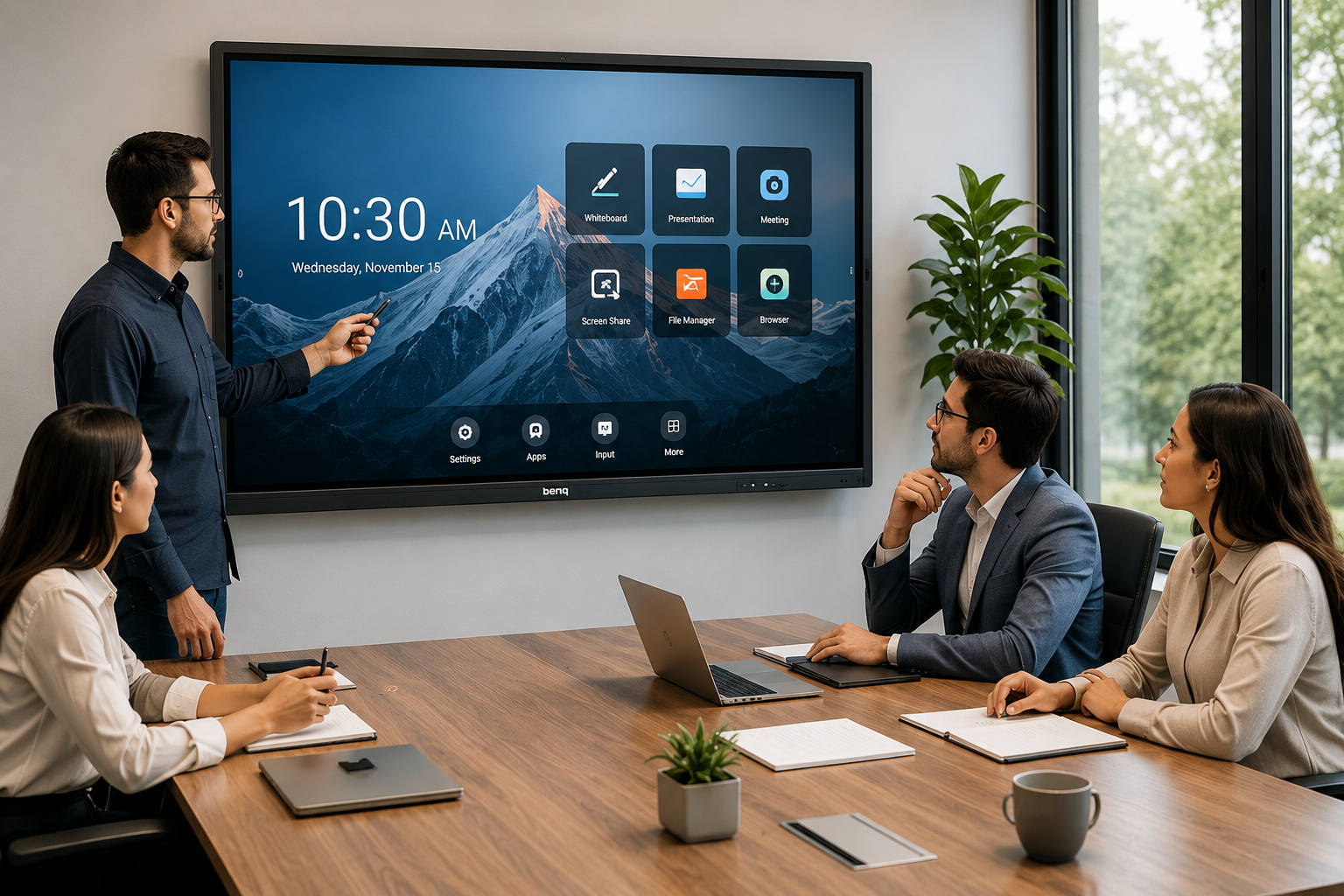
Businesses and educational institutions are rapidly replacing traditional projectors and whiteboards with Interactive Flat Panel technology. Whether it is a corporate boardroom, smart classroom, training center or collaborative workspace, interactive displays provide a more engaging, efficient and professional communication experience.
Modern interactive displays, interactive touch displays, and touch screen displays are designed to improve collaboration, simplify presentations and enhance productivity. Unlike conventional display systems, these solutions combine high-resolution visuals, multi-touch functionality, wireless connectivity and intelligent collaboration features into a single platform.
This guide explains everything businesses should know before investing in an Interactive Flat Panel. You'll learn how these displays work, their advantages, different types, industry applications, buying considerations and how leading brands like Samsung and LG compare for commercial environments.
Table of Contents
- What is an Interactive Flat Panel?
- Benefits of Interactive Flat Panels
- Types of Interactive Flat Panels
- Industry Applications
- How to Choose the Right Interactive Flat Panel
- Samsung vs LG Interactive Displays
- Why Businesses Choose Vishwanath Traders
- Frequently Asked Questions
- Conclusion
What is an Interactive Flat Panel?
An Interactive Flat Panel (IFP) is a large commercial-grade touch-enabled display that allows users to write, draw, annotate, present and collaborate directly on the screen.
Unlike projectors, Interactive Flat Panels provide:
- 4K Ultra HD resolution
- Multi-touch support
- Anti-glare display
- Wireless screen sharing
- Built-in Android operating system
- Cloud collaboration
- Video conferencing compatibility
These displays are commonly used in:
- Smart classrooms
- Corporate meeting rooms
- Training centers
- Government organizations
- Healthcare facilities
- Retail experience centers
Interactive Flat Panels are often integrated with other professional display technologies including:
- Interactive Displays
- Interactive Touch Displays
- Commercial Displays
- Touch Screen Displays
- Smart Classroom Displays
Together, these technologies create modern collaborative workspaces where information can be shared and edited in real time.
Benefits of Interactive Flat Panels
Businesses are increasingly adopting Interactive Flat Panels because they improve communication while reducing the limitations of traditional presentation equipment.
Better Collaboration
Multiple users can write or interact with the display simultaneously, making meetings more productive.
Superior Image Quality
Commercial-grade 4K panels deliver sharper visuals than conventional projectors, even in brightly lit rooms.
Wireless Connectivity
Modern panels support wireless casting from laptops, smartphones and tablets without complicated cable management.
Lower Maintenance
Unlike projectors, there are no lamps to replace and minimal maintenance requirements over the product lifecycle.
Improved Productivity
Teams can annotate presentations, save meeting notes digitally and instantly share content with participants.
Professional Business Experience
Interactive Flat Panels create a modern, technology-driven environment for customers, employees and stakeholders while supporting hybrid collaboration and digital transformation initiatives.
Types of Interactive Flat Panels
Selecting the right Interactive Flat Panel depends on the environment, collaboration requirements and business objectives. Different display technologies are designed for different use cases, from classrooms to enterprise boardrooms.
1. Education Interactive Flat Panels
Education-focused Interactive Flat Panels are built for schools, colleges, universities and training institutes.
Best Features
- Multi-user writing support
- Smart whiteboard software
- Screen recording
- Annotation tools
- Classroom management
- Android operating system
Best For
- Schools
- Colleges
- Coaching Institutes
- Training Centers
2. Corporate Interactive Displays
Corporate Interactive Displays focus on business collaboration and professional presentations.
Best Features
- Wireless screen sharing
- Microsoft Teams compatibility
- Zoom compatibility
- Video conferencing
- Digital whiteboarding
- Multi-device connectivity
Best For
- Corporate Offices
- Boardrooms
- Meeting Rooms
- Conference Rooms
3. Interactive Touch Displays
Interactive Touch Displays provide responsive touch technology for environments where multiple users need to collaborate simultaneously.
Best Features
- Ultra-fast touch response
- Multi-touch gestures
- Precision writing
- Palm rejection
- High brightness
- Anti-glare coating
Best For
- Design Teams
- Architects
- Engineers
- Product Demonstrations
4. Smart Classroom Displays
Smart Classroom Displays transform traditional classrooms into interactive learning environments.
Key Benefits
- Digital teaching
- Interactive quizzes
- Multimedia presentations
- Cloud learning integration
- Hybrid education support
Best For
- Universities
- Schools
- Coaching Centers
- Government Institutions
5. Commercial Touch Screen Displays
Commercial-grade Touch Screen Displays are designed for continuous business use and deliver greater durability than consumer televisions.
Best Features
- 16/7 or 24/7 operation
- Industrial-grade panels
- Commercial warranty
- Long operational lifespan
- Enterprise connectivity
Best For
- Retail Stores
- Customer Experience Centers
- Reception Areas
- Exhibition Spaces

Industry Applications
Interactive Flat Panels are no longer limited to classrooms. Today, they are widely adopted across industries to improve communication, collaboration and customer engagement.
Corporate Offices
Businesses use Interactive Flat Panels for:
- Board meetings
- Project discussions
- Video conferencing
- Strategy planning
- Client presentations
- Team collaboration
Compared with traditional projectors, Interactive Flat Panels provide sharper visuals, lower maintenance and a more professional meeting experience.

Education
Educational institutions benefit from:
- Interactive teaching
- Digital classrooms
- Live annotation
- Student participation
- Online learning
- Multimedia lessons
Teachers can present, write, save notes and instantly share learning material with students.
Healthcare
Hospitals and healthcare facilities use Interactive Displays for:
- Medical presentations
- Staff training
- Patient education
- Conference rooms
- Digital communication
These systems help improve collaboration while simplifying information sharing.
Government Organizations
Government departments deploy commercial interactive displays for:
- Command centers
- Meeting rooms
- Digital presentations
- Training facilities
- Public information
Commercial-grade displays offer higher reliability for continuous institutional use.
Retail & Experience Centres
Retail businesses use Interactive Touch Displays to create engaging customer experiences.
Applications include:
- Product catalogs
- Digital product demonstrations
- Interactive kiosks
- Store navigation
- Promotional campaigns
These solutions improve customer engagement while supporting modern retail environments.
Hotels & Hospitality
Hotels use Interactive Flat Panels for:
- Meeting rooms
- Conference halls
- Training sessions
- Corporate events
- Business centres
Combined with Hospitality TVs and Commercial Displays, they create a complete business communication ecosystem.
Manufacturing & Industrial Training
Manufacturing companies deploy Interactive Flat Panels for:
- Safety training
- Process visualization
- Technical presentations
- Production planning
- Engineering collaboration
Large touch-enabled displays improve understanding of complex workflows and technical documentation.
Professional Services
Consulting firms, financial institutions, architecture firms and legal organizations increasingly use Interactive Displays for presentations, brainstorming sessions and secure client meetings.
Their ability to combine writing, collaboration and content sharing on a single screen makes them an ideal solution for modern knowledge-driven businesses.
How to Choose the Right Interactive Flat Panel
Choosing the right Interactive Flat Panel requires more than simply comparing screen sizes or prices. Businesses should evaluate the display based on usage, collaboration requirements, software compatibility and long-term reliability.
The following checklist helps organizations select the right commercial solution.
1. Screen Size
Screen size should match the room dimensions and viewing distance.
| Room Type | Recommended Size |
|---|---|
| Small Meeting Room | 55–65 Inch |
| Medium Conference Room | 65–75 Inch |
| Large Boardroom | 75–86 Inch |
| Training Centre | 75–86 Inch |
| Smart Classroom | 75–86 Inch |
A larger display improves visibility for presentations and collaborative sessions.
2. Touch Performance
Touch accuracy directly impacts user experience.
Look for:
- 20+ Point Multi-Touch
- Palm Rejection
- Low Response Time
- Stylus Support
- Smooth Handwriting
- Natural Writing Experience
High-quality Interactive Touch Displays feel almost identical to writing on paper.
3. Display Quality
Image quality affects readability, presentations and long working sessions.
Important specifications include:
- 4K UHD Resolution
- Anti-Glare Glass
- High Brightness
- Wide Viewing Angles
- IPS Panel
- Commercial Grade Display
Better display quality reduces eye strain while improving presentation clarity.
4. Connectivity
Modern businesses connect multiple devices during meetings.
Choose displays supporting:
- HDMI
- USB-C
- USB 3.0
- DisplayPort
- LAN
- Wi-Fi
- Bluetooth
Wireless screen sharing is becoming a standard requirement for collaborative workspaces.
5. Operating System
Most Interactive Flat Panels include built-in operating systems.
Popular options include:
- Android
- Windows OPS Compatibility
- Google EDLA (on supported models)
This allows users to access whiteboard software, browsers and productivity applications directly from the display.
6. Collaboration Features
Professional Interactive Displays should include:
- Wireless Casting
- Split Screen
- Annotation Tools
- Whiteboard Software
- Cloud Storage Integration
- Microsoft Teams Compatibility
- Zoom Compatibility
- Google Workspace Compatibility
These features improve meeting efficiency while supporting hybrid work environments.
7. Commercial Warranty & Support
Unlike consumer televisions, commercial Interactive Flat Panels are designed for continuous business operation.
Before purchasing, verify:
- Commercial Warranty
- After-Sales Support
- Installation Assistance
- Spare Part Availability
- Software Updates
- Technical Support
Reliable support significantly reduces long-term operational costs.
Samsung vs LG Interactive Displays
Samsung and LG are among the leading manufacturers of commercial display solutions. Both brands offer enterprise-grade Interactive Flat Panels, but each has strengths suited to different business requirements.
| Feature | Samsung Interactive Displays | LG Interactive Displays |
| Display Quality | Excellent | Excellent |
| 4K Resolution | ✔ | ✔ |
| Touch Performance | Excellent | Excellent |
| Wireless Collaboration | Advanced | Advanced |
| Corporate Meeting Rooms | Excellent | Excellent |
| Smart Classroom Deployment | Excellent | Excellent |
| Reliability | Commercial Grade | Commercial Grade |
| Enterprise Support | Strong | Strong |
Which Brand Should You Choose?
Choose Samsung if:
- You require enterprise collaboration features.
- Your organization frequently conducts board meetings.
- Microsoft Teams integration is important.
- You need premium commercial display performance.
Choose LG if:
- You want highly reliable commercial display solutions.
- Hospitality, retail or healthcare deployments are a priority.
- You require flexible digital signage integration.
- Long-term commercial usage is a key requirement.
Both brands deliver high-quality Interactive Flat Panels suitable for professional business environments. The ideal choice depends on room size, software ecosystem, collaboration needs and budget.
Why Businesses Choose Vishwanath Traders
Organizations across India choose Vishwanath Traders for commercial display requirements because of its experience, product portfolio and enterprise-focused procurement capabilities.
Established Since 2012
More than a decade of experience supplying commercial display solutions for businesses.
Pan-India Supply
Reliable delivery and deployment support for organizations across India.
Official VU Partner
Access to genuine VU commercial and smart television solutions.
Samsung & LG Reseller
Commercial display products from globally recognized brands.
Enterprise Procurement Support
Bulk procurement assistance for corporate, institutional and government requirements.
GST Billing
Transparent documentation and tax-compliant procurement for businesses.
Wide Product Portfolio
Solutions include:
- Interactive Flat Panels
- Commercial Displays
- Video Walls
- Digital Signage
- Hospitality TVs
- Professional Display Systems
Dedicated B2B Support
Assistance with product selection, quotations and commercial deployments tailored to business requirements.
By combining commercial-grade products with procurement expertise, Vishwanath Traders helps organizations implement reliable display solutions for collaboration, communication and digital transformation initiatives.
Frequently Asked Questions (FAQs)
1. What is an Interactive Flat Panel?
An Interactive Flat Panel is a commercial-grade touch-enabled display that allows users to present, write, annotate and collaborate directly on the screen. It combines a 4K display, multi-touch technology and built-in software to support modern business and educational environments.
2. How is an Interactive Flat Panel different from a projector?
Unlike projectors, Interactive Flat Panels provide:
- Better image quality
- No shadow interference
- Lower maintenance
- Higher brightness
- Longer lifespan
- Multi-touch collaboration
They are designed specifically for continuous professional use.
3. Which industries use Interactive Flat Panels?
Interactive Flat Panels are widely used in:
- Corporate Offices
- Educational Institutions
- Healthcare
- Government Organizations
- Hospitality
- Retail
- Training Centres
- Co-working Spaces
4. What screen size should I choose?
The ideal screen size depends on room dimensions.
- 55–65 Inch – Small meeting rooms
- 65–75 Inch – Medium conference rooms
- 75–86 Inch – Boardrooms & classrooms
Choosing the correct size improves visibility and collaboration.
5. Are Interactive Flat Panels suitable for video conferencing?
Yes.
Most commercial Interactive Flat Panels support Microsoft Teams, Zoom, Google Meet and wireless screen sharing, making them ideal for hybrid meetings and remote collaboration.
6. Can multiple people use the display simultaneously?
Yes.
Modern Interactive Touch Displays support multi-touch functionality, allowing several users to write, draw and collaborate at the same time.
7. Which brands offer commercial Interactive Flat Panels?
Leading manufacturers include:
- Samsung
- LG
- Panasonic
Each brand provides commercial-grade solutions designed for business, education and institutional applications.
8. What should businesses consider before purchasing?
Key factors include:
- Display size
- Touch accuracy
- Resolution
- Brightness
- Connectivity
- Operating system
- Warranty
- Commercial support
- Installation requirements
- Long-term reliability
Evaluating these factors helps organizations choose the right solution for their environment.
9. Are Interactive Flat Panels better than traditional whiteboards?
Yes.
They combine digital writing, wireless collaboration, cloud connectivity and high-resolution displays into a single device, making meetings and training sessions more efficient than conventional whiteboards.
10. Where can businesses buy commercial Interactive Flat Panels in India?
Businesses should work with experienced B2B suppliers that provide genuine commercial products, deployment guidance, GST invoicing, warranty support and enterprise procurement assistance.
Conclusion
Interactive Flat Panels have become an essential part of modern business communication and collaborative workspaces. Whether deployed in corporate boardrooms, smart classrooms, healthcare facilities or training centres, these displays improve engagement, simplify presentations and support more effective decision-making.
Choosing the right solution involves evaluating display quality, touch performance, connectivity, software compatibility and long-term commercial support. Businesses should also ensure they invest in products designed for continuous professional use rather than consumer-grade alternatives.
For organizations planning large-scale deployments or enterprise procurement, working with an experienced commercial display supplier ensures access to genuine products, reliable support and solutions tailored to operational requirements.
Need the Right Interactive Flat Panel for Your Business?
Whether you're setting up a smart classroom, corporate meeting room, training centre or enterprise collaboration space, Vishwanath Traders provides commercial display solutions from trusted brands including Samsung LG Panasonic
From Interactive Flat Panels and Commercial Displays to Video Walls and Digital Signage Solutions, businesses across India rely on Vishwanath Traders for professional consultation, bulk procurement support and pan-India supply.