
Google TV vs Android TV: Which is Better for Your VU TV in 2026?
If you are shopping for a new smart TV in 2026, you have likely come across two names Google TV and Android TV. Both come from Google, both run the same core operating system, and both give you access to the Google Play Store, Chromecast built-in, and Google Assistant.
So what is the real difference? And more importantly, which one should you look for when buying a VU TV whether it is a VU 43 inch TV 4K for your bedroom, a VU 55 inch TV for your living room, or a VU 65 inch TV for your home theatre?
This guide explains everything you need to know about Google TV vs Android TV in simple, practical terms.
What is Android TV?
Android TV has been around since 2014. It is Google's smart TV platform that runs on Android, giving you access to thousands of apps from the Google Play Store, voice control via Google Assistant, and built-in Chromecast for casting content from your phone.
Android TV uses a traditional grid-based interface. You scroll through rows of apps and content recommendations. It works well, but over the years it started to feel a bit outdated compared to newer platforms.
Key features of Android TV :
- App grid interface with rows of content
- Google Play Store with thousands of apps
- Google Assistant voice control
- Chromecast built-in
- Regular security and feature updates
What is Google TV?
Google TV launched in 2020 as the successor to Android TV. It is not a new operating system it is actually a new interface layer on top of Android TV. Think of it this way: Android TV is the engine, Google TV is the dashboard.
The biggest change with Google TV is the focus on content discovery. Instead of showing you a grid of apps, Google TV organises content from all your streaming services in one place. It learns your preferences over time and recommends movies, shows, and videos based on what you like.
Key features of Google TV:
- Content-first interface organised by your preferences
- "Watchlist" feature to save content across apps
- Google TV app for phone to control your TV
- Kids profiles with parental controls
- Google Assistant with smarter recommendations
- All the same apps and features as Android TV
Google TV vs Android TV: Key Differences
Interface and Design
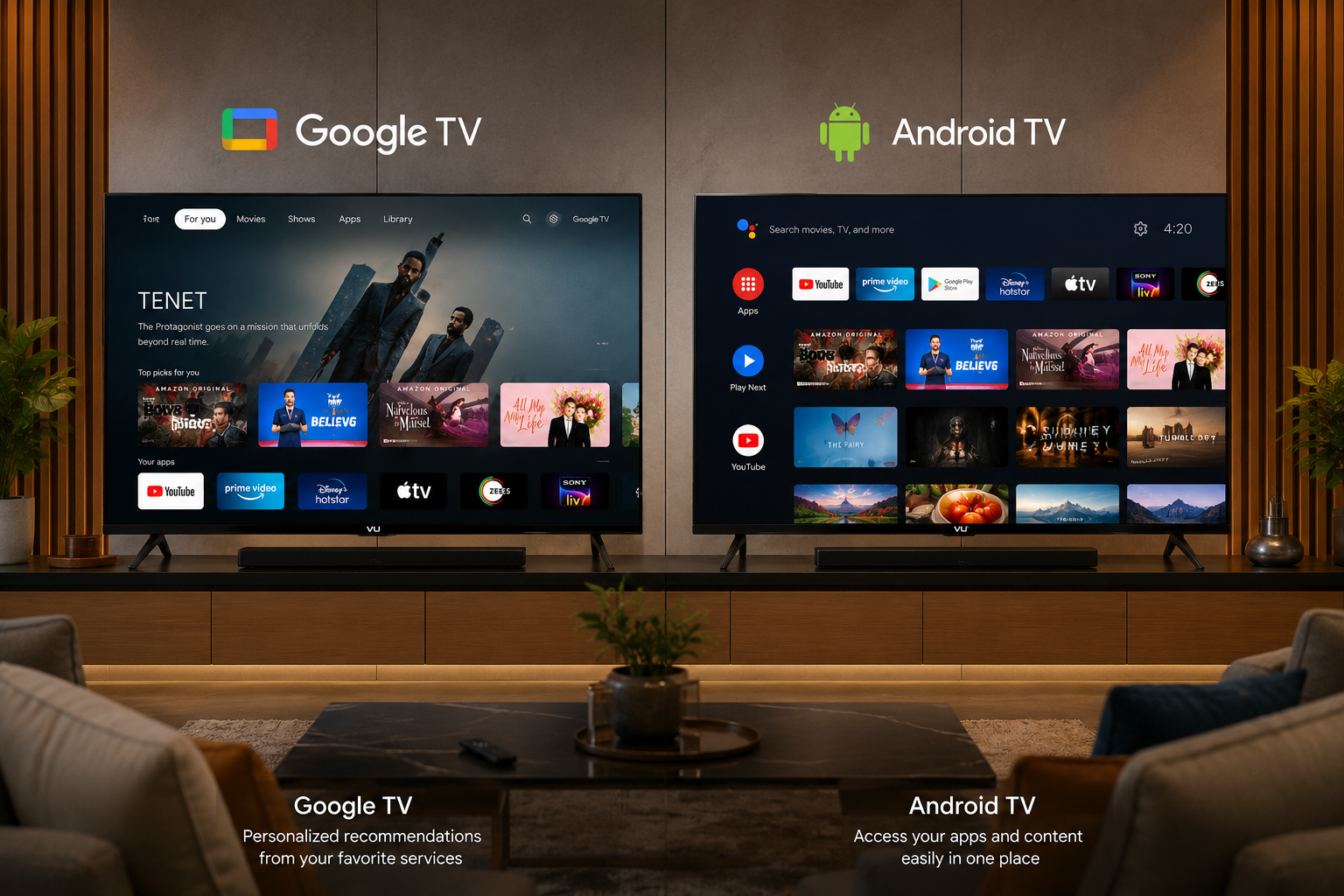
Android TV shows you a row of apps at the top, followed by content recommendations from each app. It is functional but can feel cluttered.
Google TV puts content first. The home screen shows personalised recommendations from Netflix, Prime Video, YouTube, Disney+ Hotstar, and other services right at the top. Apps are tucked away in a tab, making the home screen cleaner and more focused on what you want to watch.
Winner : Google TV especially if you stream a lot of content and want a cleaner, smarter interface.
Performance and Speed
Both platforms run on the same hardware, so raw performance is similar. However, Google TV feels snappier because the interface is better optimised. Animations are smoother, navigation feels more responsive, and the system uses resources more efficiently.
On newer VU TV models like the VU Glo QLED TV and VU Vibe DV QLED TV Google TV runs exceptionally well thanks to modern processors and adequate RAM.
Winner : Google TV slightly better optimised.
App Support and Availability
Both platforms have access to the same Google Play Store. You get the same apps Netflix, Prime Video, YouTube, Hotstar, Zee5, Sony LIV, JioCinema, and thousands more. If an app is available on Android TV, it works on Google TV too.
The only difference is that some newer apps are being designed with Google TV's interface in mind, so they may look slightly better on Google TV.
Winner : Tie exactly the same app ecosystem.
Voice Control and Google Assistant
Both platforms have Google Assistant built-in. You can search for content, control smart home devices, check the weather, and more using your voice. The experience is identical on both platforms.
Winner: Tie.
Content Discovery
This is where Google TV clearly pulls ahead. Google TV's content recommendation engine learns what you watch and suggests new content across all your subscribed services. You can add movies and shows to a universal Watchlist and find them easily later.
Android TV shows content recommendations too, but they are organised by app rather than by your interests. This makes Google TV much better for discovering new things to watch.
Winner: Google TV.
Updates and Future Support
Google has stopped developing Android TV as a separate interface. All new smart TVs launching in 2025 and 2026 come with Google TV. Android TV still receives security updates, but major feature updates are now focused on Google TV.
If you want the latest features and the best experience, Google TV is the way forward.
Winner: Google TV.
Which VU TV Models Have Google TV?
All current VU TV models come with Google TV built-in. Here is a quick overview:
VU Glo QLED TV (Dolby Edition) — Available in 43 inch, 55 inch, 65 inch, and 75 inch sizes. All models run Google TV with Dolby Vision and Dolby Atmos support. The VU 43 inch TV 4K in the Glo series is one of the most affordable Google TV options in India.
VU Vibe DV QLED TV — Available in 55 inch and 65 inch sizes. These premium models run Google TV with Dolby Vision IQ for smarter picture adjustment based on your room lighting.
VU Masterpiece Frame TV — Available in 55 inch and 65 inch sizes. Runs Google TV with a unique art mode interface that transforms your TV into a digital canvas when not in use.
Does Google TV Affect VU TV Price?
The VU TV 55 inch price or VU 43 inch TV 4K price is not significantly affected by the choice of Google TV versus Android TV. Google TV comes standard on all new VU models, and the pricing is determined by the hardware display panel, processor, speakers, and build quality.
What this means is that you get a superior smart TV experience at no extra cost when you buy a VU TV from an authorised VU TV dealer in Delhi like Vishwanath Traders.
Should You Upgrade from Android TV to Google TV?
If you already own an Android TV, you might be wondering if you need to upgrade. The answer depends on your needs:
Stick with Android TV if : Your TV works fine, you are happy with the performance, and you primarily use a streaming device or set top box.
Upgrade to Google TV if : You are buying a new TV, want a cleaner interface, value content recommendations, or want the latest smart TV features.
For most buyers, the decision is simple if you are buying a new VU TV in 2026, it will come with Google TV. Whether you choose a VU 43 inch TV 4K, a VU 55 inch TV a
VU 65 inch TV or a VU 75 inch TV , you get the best smart TV platform Google has to offer.
Google TV Tips for VU TV Users
Here are some tips to get the most out of Google TV on your VU TV:
Use the Watchlist — When you find a movie or show you want to watch later, press and hold the Select button to add it to your Watchlist. It syncs across all your devices.
Customise your channels — Google TV lets you rearrange content channels on the home screen. You can hide channels you do not use and pin your favourite streaming services.
Set up Kids Profiles — Google TV has excellent parental controls. You can create a kids profile with age-appropriate content and set screen time limits.
Use Google TV on your phone — The Google TV app for Android and iOS lets you browse content, add to Watchlist, and even cast to your TV.
Voice search across apps — Instead of searching each app separately, use Google Assistant to search across all your subscribed services at once.
FAQs About Google TV and Android TV
Q1: Is Google TV better than Android TV?
Yes, Google TV offers a better interface with smarter content recommendations, smoother performance, and regular feature updates. It is the same operating system underneath, so all Android TV apps work on Google TV too.
Q2: Does VU TV have Google TV or Android TV?
All current VU TV models VU Glo QLED, VU Vibe DV QLED, and VU Masterpiece Frame come with Google TV built in.
Q3: Can I upgrade my Android TV to Google TV?
Some older Android TV devices can be upgraded to the Google TV interface through a system update, but not all. Check your TV settings for system updates or contact the manufacturer.
Q4: Does Google TV work on VU 43 inch 4K TV?
Yes, the VU 43 Glo QLED TV comes with Google TV. It is one of the most popular VU 43 inch TV 4K options in India.
Q5: Which is faster Google TV or Android TV?
Google TV feels faster and smoother because the interface is better optimised, even on the same hardware.
Q6: Are all apps available on Google TV?
Yes, Google TV has access to the same Google Play Store as Android TV, with thousands of apps including Netflix, Prime Video, YouTube, Hotstar, and all major Indian streaming services.
Final Verdict
Google TV is a clear winner over Android TV. It offers a better interface, smarter content discovery, smoother performance, and ongoing updates. Since all new VU TV models come with Google TV, you do not have to choose every VU 43 inch TV 4K , VU 55 inch TV , VU 65 inch TV and VU 75 inch TV already has the best smart TV platform built in.
Contact Vishwanath Traders your authorised VU TV dealer in Delhi to explore VU TV models with Google TV and find the perfect size and VU TV price for your home or business.